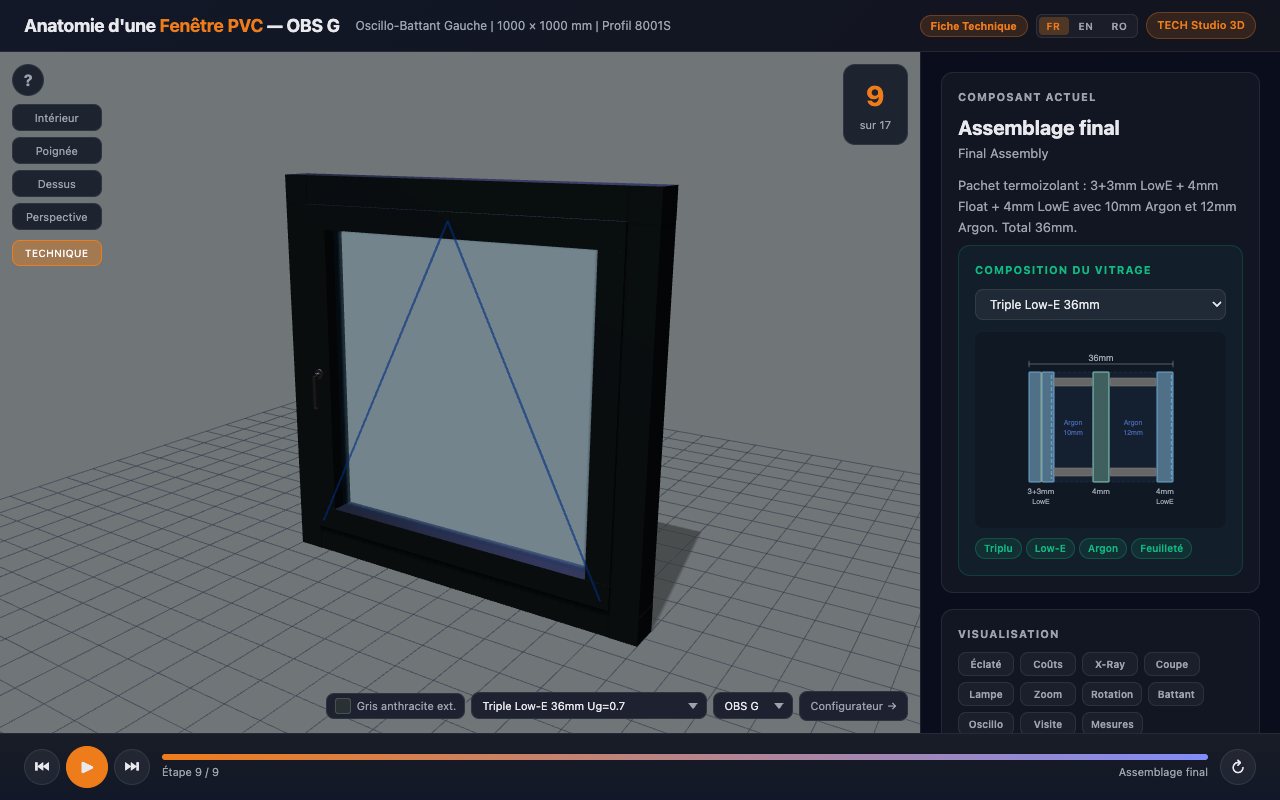
The configurator is for choosing and pricing. The 3D Studio is for
understanding what you are choosing: how the window is built, from
the inside.
The configurator
You build it, the price follows.
The journey runs from product type to summary: material,
dimensions, panels, opening, colour, glazing, options. At each
choice, the 3D window and the price including VAT update.
Exploded view, profile cross-section, X-ray transparency,
animated opening, dimensioning. The "3D Studio" button in the
configurator opens it with your dimensions, your colour, your
glazing and your opening.
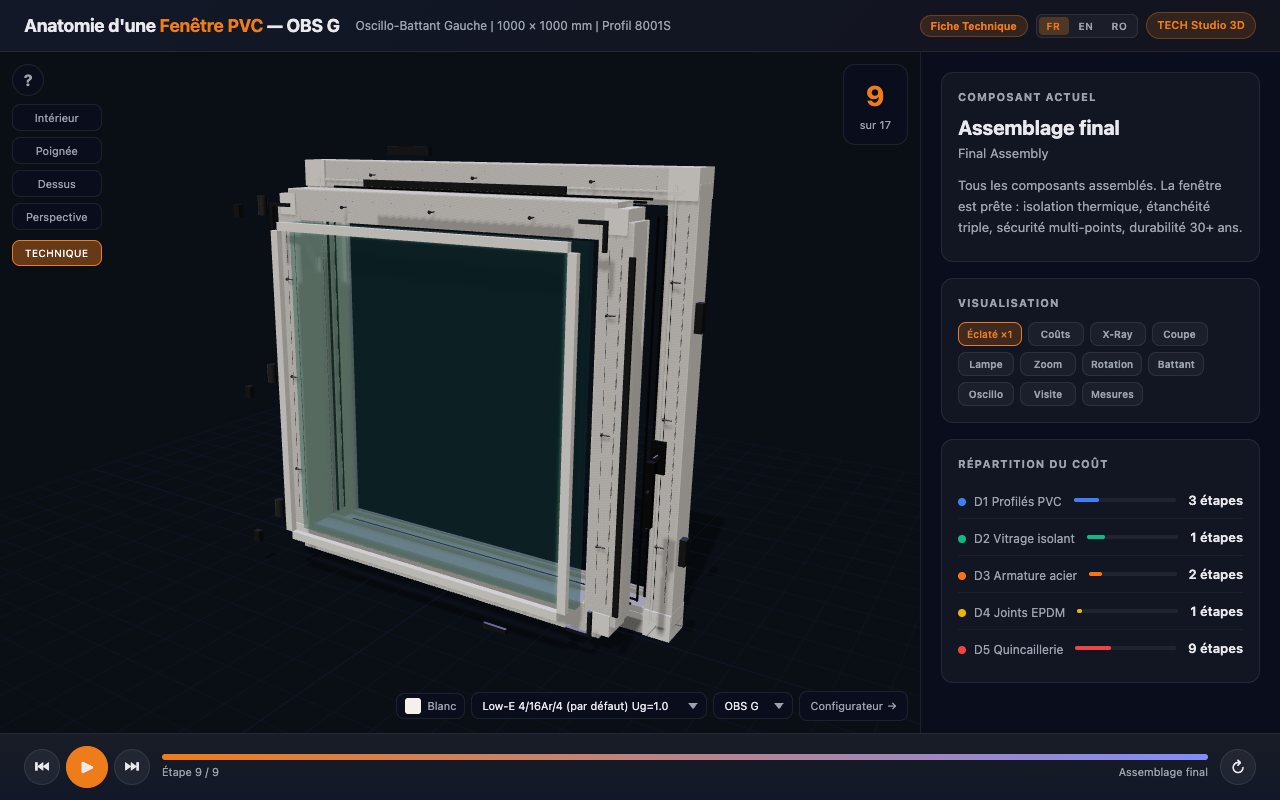
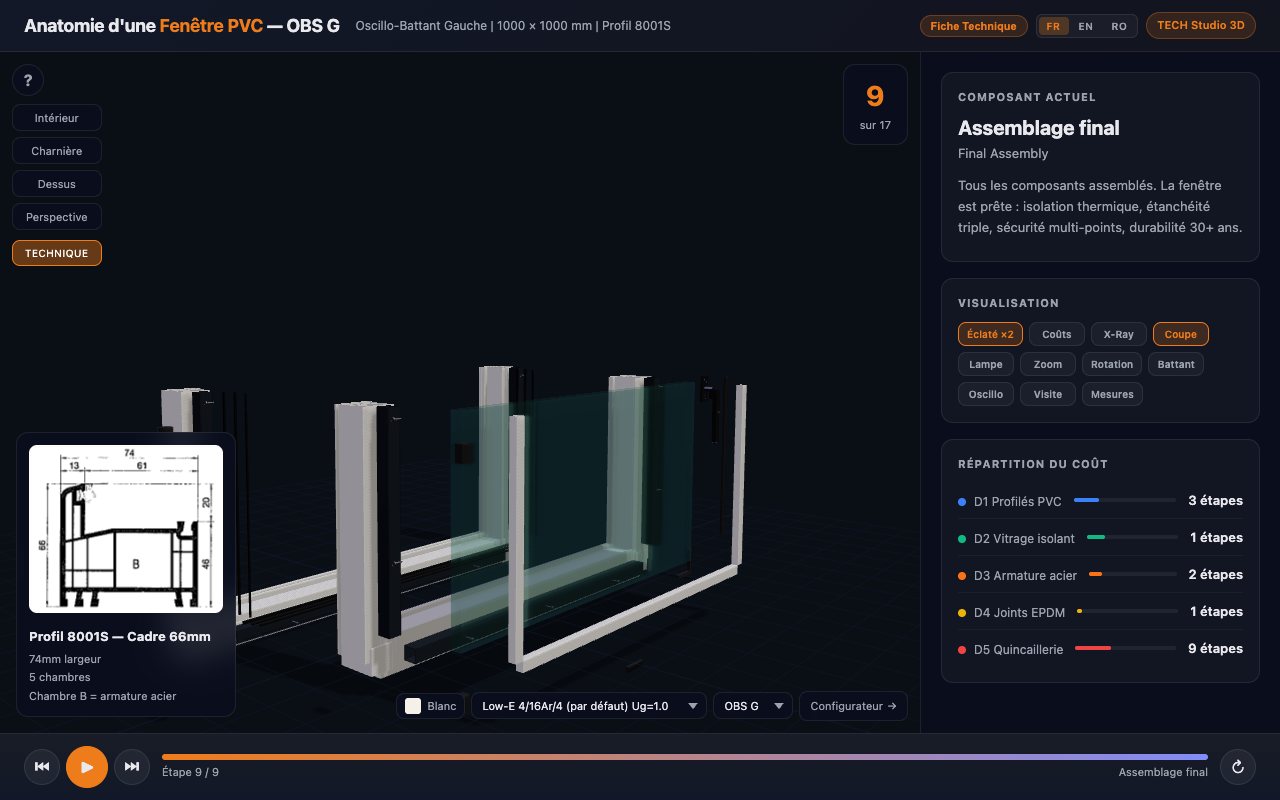
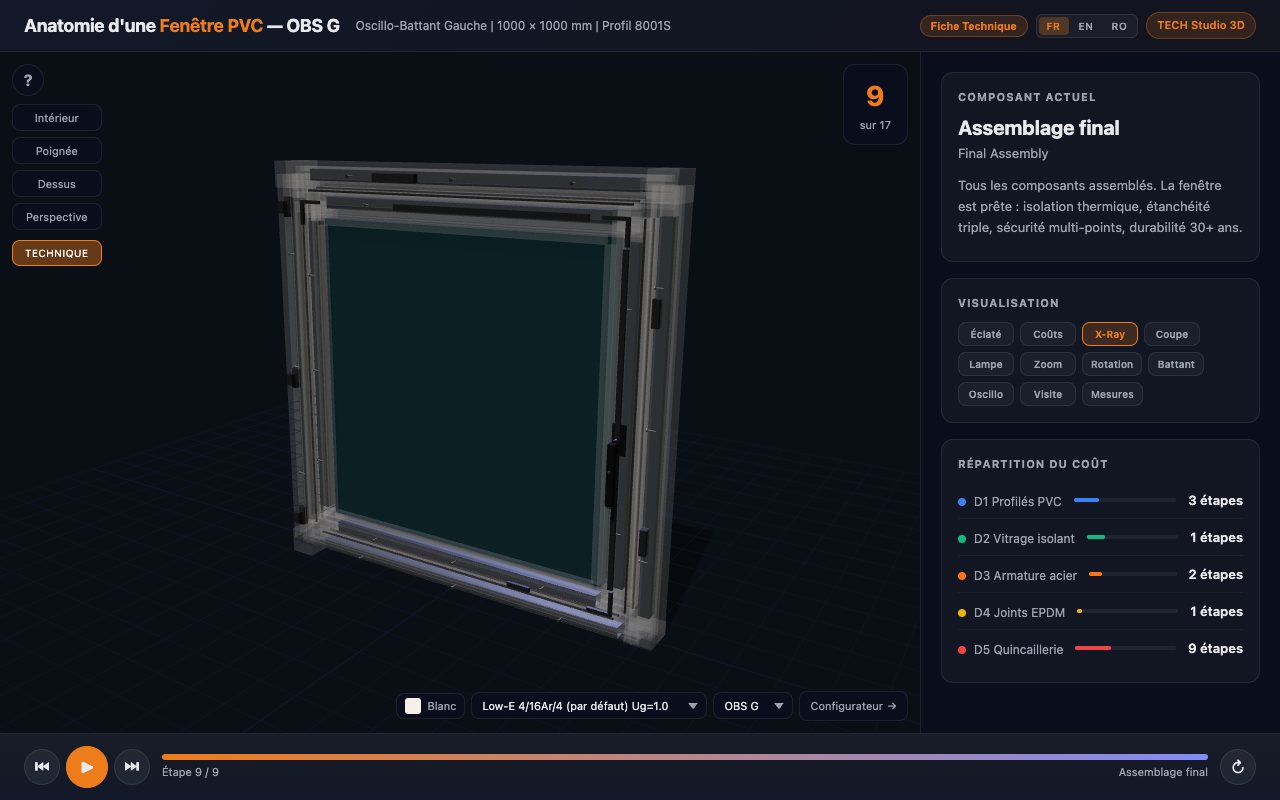
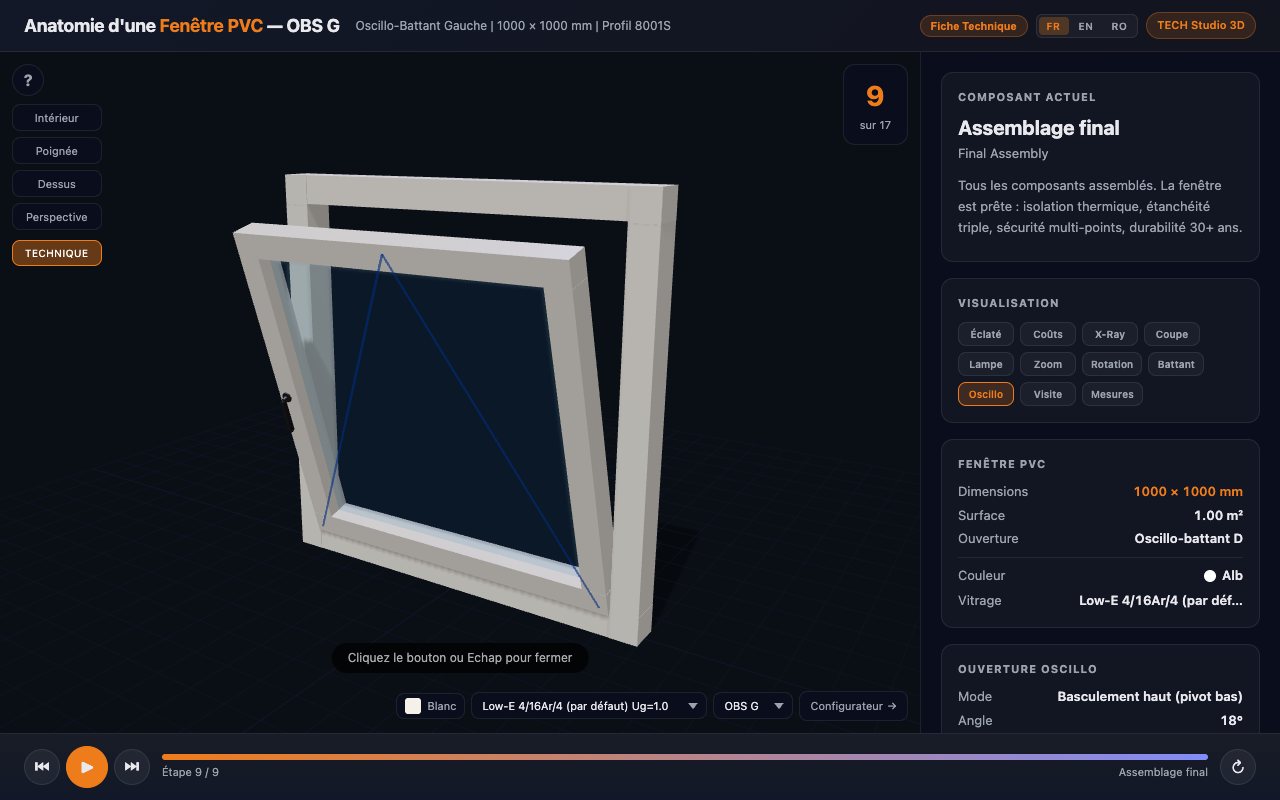
Four captures of the Studio, as they appear: a 1,000 × 1,000 mm
tilt-and-turn PVC window.
Exploded view
Frame, sash, glazing, seals and hardware move apart over three
levels so each part can be read on its own.
Profile cross-section
The 8001S profile: 66 mm frame, 74 mm wide, 5 chambers.
Chamber B holds the steel reinforcement.
X-ray transparency
The PVC turns transparent: the steel reinforcement and the
hardware show up inside the profile.
Animated opening
Top tilt, bottom pivot: 18° opening angle, 268 mm interior
projection for this 1,000 × 1,000 mm sash.
Other Studio modes: torch light, zoom, automatic rotation, casement
opening, guided assembly tour, dimensioning and point-to-point
measuring, cost breakdown by item.
12 compositions, from Ug 1.4 (standard double glazing) to Ug 0.6 (triple Low-E glazing with Warm Edge spacer). Listed below.
Opening
7 types: tilt-and-turn left or right, casement left or right, sliding left or right, fixed.
Dimensions and sashes
Chosen in the configurator, then carried over as is by the Studio.
Colour and glazing
Anthracite grey and 36 mm triple Low-E glazing: the Studio shows
the composition (3+3 mm Low-E, 4 mm, 4 mm Low-E, 10 and 12 mm
argon) and the Ug value.
The 12 glazings in the Studio
Ug is the glazing's heat transfer coefficient, in W/m²K: the lower
it is, the better the glazing insulates.
Family
Composition
Ug (W/m²K)
Insulation
Standard 4/16/4 air
1.4
Low-E 4/16Ar/4 (default glazing)
1.0
Planitherm 4S + Warm Edge
0.9
Triple Low-E 36 mm
0.7
Triple Low-E + Warm Edge 36 mm
0.6
Laminated and security
Laminated 331/14Ar/4
1.2
Laminated 331/12Air/331
1.4
Tempered 441/10Ar/6
1.0
Tinted, reflective, decorative
Bronze reflective
1.1
Decorative sandblasted
1.4
Textured cathedral
1.2
Mirror
1.0
Values as displayed in the 3D Studio. They describe the glazing
alone, not the complete window.
See what you no longer see once the window is fitted
A window is judged by what you cannot see after installation: the
steel reinforcement inside the profile chambers, the glazing
composition, the seals, the hardware. The 3D Studio makes them
visible before you order, with the same dimensions as your
configuration.
Frequently asked questions
Is the configurator free?
Yes. No sign-up is needed to configure a window, see it in 3D and read the price including VAT. An account is only useful to save your configurations.
Is the displayed price VAT-inclusive?
Yes. The price is shown including VAT, and the summary breaks it down into the amount excluding tax and the VAT.
What does the 3D Studio show?
A PVC window in real-time 3D: three-level exploded view, horizontal cross-section of the profile and its chambers, X-ray transparency to see the reinforcement and the hardware, animated casement or tilt-and-turn opening, dimensioning and point-to-point measuring.
Can I see my own configuration in the 3D Studio?
Yes. The "3D Studio" button in the configurator opens the Studio with the dimensions, colour, glazing and opening you chose.
Does the 3D Studio work on mobile?
Yes, in a recent WebGL-capable browser, on computer, tablet and phone. The interface is available in French, English and Romanian.
Can I print a technical sheet?
Yes. The "Technical sheet" button in the 3D Studio prepares a printable sheet for the window on screen.
Start with your window
Choose your dimensions, look at it in 3D, read the price. A free quote remains available at any time.